Track Sats2.1
Publisher Description
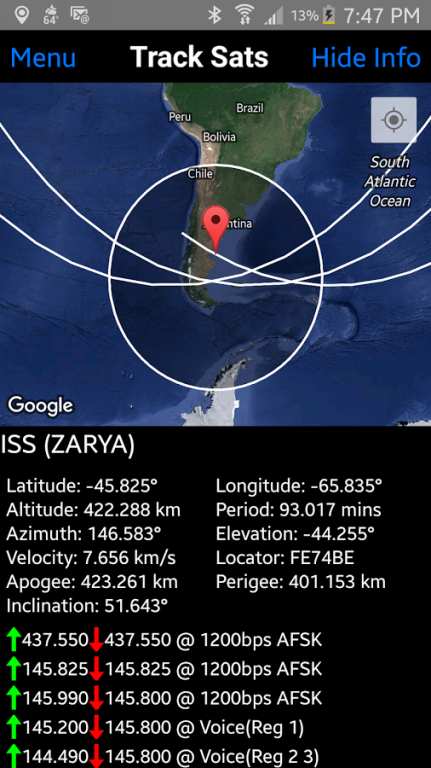
Have you ever had the need (or just the curiosity) to know what satellites are orbiting above you right now?
Track Sats aims to fulfill this need allowing you to track over 5,000 satellites currently orbiting Earth. Track Sats also does all the heavy mathematical calculations on our servers preventing your phone from losing precious battery life.
If you're an amateur radio operator or just want to know when a satellite is passing overhead, Track Sats also provides you with the information for the next passes at your location - never miss another QSO again! Transponder information is also available with the click of a button.
If you find any bugs or just want to shoot us a suggestion, please inform us at our email.
Thanks for using Track Sats!
About Track Sats
The company that develops Track Sats is Joshua Ferrara. The latest version released by its developer is 2.1. This app was rated by 1 users of our site and has an average rating of 5.0.
To install Track Sats on your Android device, just click the green Continue To App button above to start the installation process. The app is listed on our website since 2016-12-29 and was downloaded 39 times. We have already checked if the download link is safe, however for your own protection we recommend that you scan the downloaded app with your antivirus. Your antivirus may detect the Track Sats as malware as malware if the download link to space.ferrara.sattrack is broken.
How to install Track Sats on your Android device:
- Click on the Continue To App button on our website. This will redirect you to Google Play.
- Once the Track Sats is shown in the Google Play listing of your Android device, you can start its download and installation. Tap on the Install button located below the search bar and to the right of the app icon.
- A pop-up window with the permissions required by Track Sats will be shown. Click on Accept to continue the process.
- Track Sats will be downloaded onto your device, displaying a progress. Once the download completes, the installation will start and you'll get a notification after the installation is finished.
Program Details
System requirements
Download information
Pricing
Version History
version 2.1
posted on 2016-12-29
Major overhaul of app. Includes searching for satellites, UI update, and optimizations.,Previously removed ads? Head over to settings and click the remove ads purchase button - you will be given the option to restore your previous purchase for free.,Happy holidays and thanks for using Track Sats!
version 2.0
posted on 2016-12-20
Major overhaul of app. Includes searching for satellites, UI update, and optimizations.,Previously removed ads? Head over to settings and click the remove ads purchase button - you will be given the option to restore your previous purchase for free.,Happy holidays and thanks for using TrackSat!
